

Reviewed · ICELAND
Iceland: Audioguide, Interactive map 200 spots ++
Iceland is easier to appreciate when someone explains what you are seeing. This self-guided audio experience pairs more than 200 locations with stories about sagas, geology, geysers, waterfalls, canyons, lagoons, and the Northern Lights. You use the map from your own car, walk, or hotel room, with no meeting point and no fixed tour bus.
I like the five hours of audio, which gives you more than quick labels at famous sights. I also like the flexible group price: $17 covers up to six people, so a family or small driving party can share one purchase. The main drawback is practical rather than scenic: continuous internet access is needed, and the app may not be ready immediately after booking.
Key points before you book
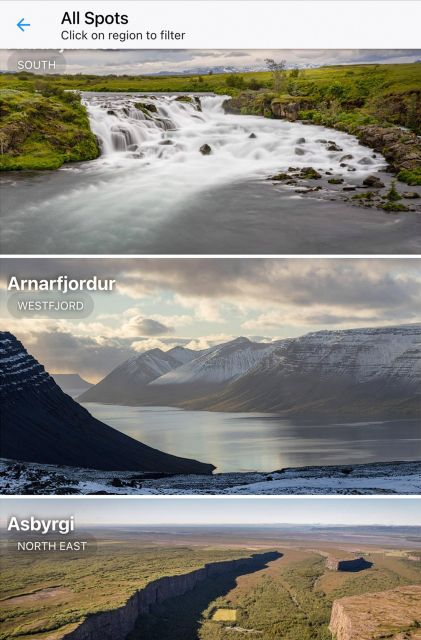
- 200 plus Icelandic stops: The guide covers well-known sights along with quieter places that may not appear on a standard day tour.
- Five hours of narration: Hear stories about Icelandic legends, natural forces, and local culture in English, French, or German.
- GPS-enabled map: Your phone shows your position and helps connect one stop to the next.
- Flexible 365-day access: Use it during a road trip, spread it across several visits, or browse before you arrive.
- One price for up to six people: At $17 per group, the value improves quickly when shared.
- A replacement-access example: After one user lost access through a mistake, My Secret Map supplied a new login, a useful sign of responsive support, though you should still save the installation email.
How this Iceland guide works in real life
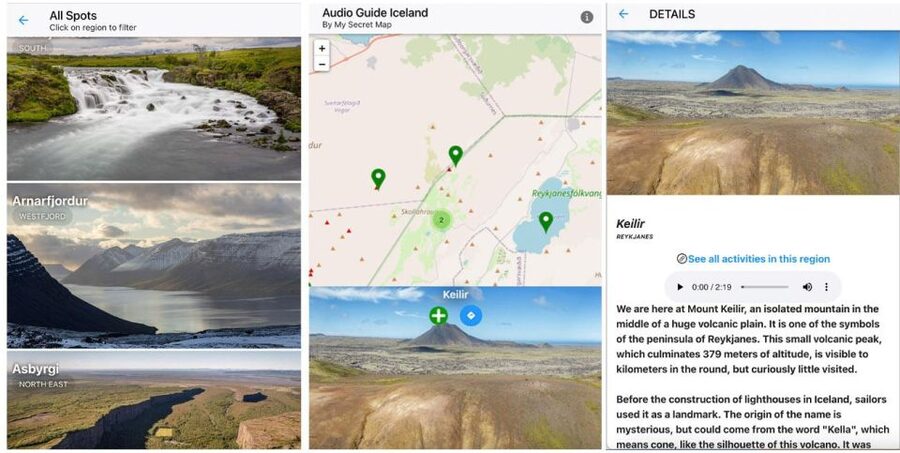
This is not a guided bus ride with a driver and a set departure time. It is a phone-based audio guide from My Secret Map, built for independent sightseeing.
After you book, you receive instructions for installing the app on an iPhone or Android device. The delivery email can take up to 24 hours, so do not wait until you are standing beside a waterfall with a dead battery and an empty inbox.
Once installed, you can open the interactive map and see the available points around your current position. Each location comes with audio, written information, route suggestions, and, in many cases, advice on good places to take photographs.
That setup gives you control. You can follow a suggested route, skip a stop, or simply open the guide when something catches your eye. It works best for a self-drive holiday, but the material can also help you plan from your accommodation.
Other Iceland days people book on the same trip:
- Reykjavik: Golden Circle Full-Day Tour with Kerid Crater
★ 4.8 · 24,485 reviews - Reykjavik Food Walk – Local Foodie Adventure in Iceland
★ 5.0 · 18,952 reviews - Iceland: Northern Lights Bus Tour from Reykjavik
★ 4.1 · 11,161 reviews
What the 200 plus stops actually add
The number is useful, but it is not the whole story. Iceland has many famous sights that are easy to locate, yet their meaning is less obvious once you arrive.
A waterfall may look spectacular without any explanation. Audio can add the geological reason for its shape, the local story connected with it, or the role it has played in Icelandic culture. A geyser becomes more than a burst of water when you understand the underground heat and pressure that create it.
The guide covers major attractions and less familiar stops. Since exact routes depend on your plans, you should not expect a single fixed itinerary that visits all 200 plus places. Think of this as a large menu of points, not a 200-stop tour completed in one holiday.
That is a good match for Iceland. You may have a full day planned around a famous circuit, then find yourself with an extra hour because the weather changes or a road plan shifts. The map lets you look for another nearby point instead of spending that time searching online.
The limits matter too. The information supplied does not give a named list of every stop, exact driving times, or a guaranteed route for each region. Before setting out, check the map and local conditions rather than assuming every suggested point is open or easy to reach.
From sagas to geysers, the stories have range
The audio content covers two main areas: human stories and natural science.
On the cultural side, you can expect references to Icelandic sagas, legends, and local traditions. These stories help give a sense of place, especially when a bare rock, valley, or coastal view has a name with centuries of meaning behind it.
On the natural side, the guide explains subjects such as geysers, volcanic activity, glaciers, waterfalls, canyons, lagoons, and the Northern Lights. That range makes the audio useful for different kinds of stops. You are not listening to the same style of commentary at every point.
I particularly like this mix for first-time visitors. Iceland’s scenery can arrive at such a fast pace that you end up collecting photographs without remembering why one place differs from the next. A short explanation of the forces beneath the ground or the stories attached to a site helps you notice more.
The guide is also suited to repeat visitors. If you have already seen the major sights, the less familiar points and extra context may give you a reason to revisit an area with a different focus.
Following waterfalls, canyons, geysers, and lagoons
The experience does not provide a detailed day-by-day program in the information supplied, so I would not book it expecting a fixed sequence of stops. Instead, use the map to build your own route around the sights you already plan to visit.
For a day focused on waterfalls, open the nearby points and listen before or during the visit. For a day built around geothermal sites, use the entries on geysers and related natural forces to connect separate stops into one story.
Canyons and lagoons offer a different pace. A canyon visit may call for more time on foot, while a lagoon stop may be part of a slower day. The audio gives you context without forcing you to keep up with a group.
The itinerary function is most valuable when you are driving. You can see how points relate to one another and choose a scenic route or a quicker connection, according to the options provided by the app. Still, do not treat the suggested route as a substitute for road information. Weather, access, and local advisories can change plans in Iceland.
Same base, a completely different sort of day out:
- Reykjavík: South Coast Waterfalls, Black Sand & Glacier Tour
★ 4.8 · 11,030 reviews - Reykjavík: Whale Watching and Marine Life Cruise
★ 4.6 · 9,838 reviews - Reykjavik: Sky Lagoon Entrance Pass With 7-Step Spa Ritual
★ 4.8 · 6,166 reviews - From Reykjavik: Golden Circle, Kerid, & Secret Lagoon Tour
★ 4.8 · 6,009 reviews
Photo advice without losing the moment
The guide includes recommendations for photo locations. That is a practical touch because Iceland offers many viewpoints, but the best camera position is not always obvious from a parking area or road.
Photo guidance can help you decide where to pause and how to fit a stop into your day. It may also prevent the common problem of spending too long at the first viewpoint and rushing through the rest of your route.
I would use this feature as a prompt, not a strict instruction. The best image may come from a location that interests you personally, and changing weather can make a planned viewpoint less appealing. Keep your attention on safe footing and marked access, especially around waterfalls, cliffs, and other natural sites.
The guide’s broader value is that it may encourage you to stop at places you would otherwise pass. You are not simply collecting a list of popular viewpoints. You are giving yourself a reason to look closer.
The map and internet requirement
The map uses geolocation to show where you are and help you find nearby points. This should be helpful on a road trip, especially when you are moving between areas and want to know what the guide offers around you.
But the internet requirement is important. The supplied instructions state that continuous internet access is essential for the map, itinerary, and media downloads. Do not assume the app will work fully offline.
Before leaving for a sightseeing day, install the app, confirm your access, and test the audio. Bring a portable charger, since GPS use and audio playback can drain a phone. Headphones are recommended for walking, while a car audio connection is better for driving.
You also need a device that meets the app’s recommended system requirements. That information is not specified here, so check it before booking if you are using an older phone.
Audio, transcripts, and language choices
The guide provides more than five hours of audio in English, French, and German. Italian is planned for the future, but it is not listed as currently available.
The written transcripts are useful in several situations. You can read when you are in a noisy place, skim a location before arriving, or return to a detail later without replaying the entire recording. They also make the guide more useful for people who prefer reading to listening.
Audio quality and ease of use matter on a self-guided product. The provider presents the app as user-friendly, but you should still set it up before your sightseeing begins. A little preparation is worth it when you are using a phone for navigation, narration, and photographs at the same time.
For a group, headphones may not be practical. If everyone wants to hear the same explanation, connect the phone to the car audio system when appropriate, or take turns listening at a stop.
The $17 group price and the 365-day window
At $17 for a group of up to six, this is a low-cost add-on for a small party. If six people share it, the per-person cost is modest. Even for one or two people, five hours of audio and access to 200 plus points can offer reasonable value if you actually use the guide.
The price is less attractive if you only open a handful of entries. You already have access to general route information through other travel tools, so the reason to buy this product is the combination of narration, cultural context, written material, photo advice, and location-based planning.
The 365-day duration gives you unusual flexibility. You can use it on one Iceland holiday, plan with it before departure, or return to it on another trip within the access period. It is not limited to a single day or a single start time.
The same flexibility can create a small problem: too much choice. I suggest selecting a few priority areas before your trip, then using the map for additions. That keeps the guide from becoming another list you feel obliged to complete.
Support, cancellation, and access details
The activity offers free cancellation up to 24 hours before the booked time, along with a reserve-now-and-pay-later option. Since access lasts 365 days, check the booking details carefully and make sure the start information suits your plans.
There is no pickup point. You can use the guide anywhere, which is the whole point of the format.
A verified booking in June 2025 described a flexible response after the user made a mistake and could no longer use the guide. My Secret Map provided a new access route. That does not guarantee every support case will work the same way, but it is sensible to contact the provider promptly if your installation goes wrong.
The experience is listed as wheelchair accessible. The app itself may be accessible, but the physical conditions at individual natural sites can vary. Check local access information for each stop before setting out.
Who will get the most from it
I would recommend this guide to you if you are:
- Driving independently and want context without joining a group.
- Traveling with a family or small party that can share one purchase.
- Interested in Icelandic stories as well as scenery.
- Visiting Iceland for the first time and wanting help linking sights together.
- Returning to Iceland and looking for lesser-known points.
- Comfortable using a smartphone for maps, audio, and route planning.
It is less suitable if you want a human guide beside you, a fixed timetable, or a fully offline product. It also may not suit a visitor who prefers to leave the phone in a pocket and make every decision spontaneously.
The 3.9 rating from 27 reviews suggests a generally useful but not flawless experience. With only a small number of ratings and limited written detail, I would pay closer attention to the technical requirements than to the score. The biggest question is simple: can you maintain internet access and keep your phone charged?
Should you book this Iceland audio guide?
Book it if you want flexible commentary across a broad range of Icelandic sights and plan to share the cost with several people. The strongest value comes from combining five hours of stories with the map, transcripts, route planning, and photo suggestions over a full year.
Skip it if you need offline access or want a personal guide who can answer questions and adjust the day in real time. For independent visitors who prepare their phones before departure, $17 is a reasonable way to add context to a road trip without surrendering control of the schedule.
FAQ
How much does the Iceland audio guide cost?
The price is $17 per group of up to six people.
How long can I use the guide?
Access lasts 365 days.
How many Icelandic locations are included?
The guide covers more than 200 spots across Iceland, including famous attractions and quieter locations.
How much audio content is provided?
You receive more than five hours of audio content.
Which languages are available?
The audio guide is available in English, French, and German. Italian is planned but is not currently listed as available.
Do I need an internet connection?
Yes. Continuous internet access is needed for the map, itinerary, and media downloads.
What equipment should I bring?
Bring a charged iPhone or Android smartphone and internet access. Headphones or a car audio connection are advised, and a portable charger is useful.
Is there a meeting point or pickup location?
No. There is no pickup location, and you can use the guide anywhere.
Just added around Iceland
- From Reykjavik: Private Golden Circle Tour in Iceland★ 5.0 · 3 reviews
- Northern Lights Private Tour from Reykjavik★ 5.0 · 3 reviews
- Exclusive Ice Climbing Experience on Sólheimajökull★ 5.0 · 3 reviews
- Private South Coast Tour: A Journey to Iceland’s Stunning Shore★ 4.5 · 3 reviews
- Easy Hike on Sólheimajökull glacier★ 5.0 · 3 reviews
- Golden Circle Private Tour Tomato Soup Lunch and Secret Lagoon with Photography★ 5.0 · 3 reviews
- Hot and cold G spots challenge★ 5.0 · 3 reviews
- Authentic Reykjavik Food Tour with Flea Market Delights★ 4.2 · 3 reviews